
Set Phonetic Nickname in Teamspeak 3 on Linux

Most gaming clans use VoIP software to communicate in game, one of the most popular applications for this is Teamspeak. Starting in Teamspeak 3.0, a text-to-speech engine is included to provide notifications of players entering and leaving channels (among other things). By default, Teamspeak will try to pronounce your nickname, not always a good thing when the nickname contains your rank (e.g. “|sgt| mtekk”, we want everyone to hear just “mtekk”) as the engine pronounces “|” as “vertical line”. In Windows and OS X you can use “Set Phonetic Nickname” under the “Self” menu. In Linux, the prompt will open, but the text box is disabled. This is due to a text-to-speech engine not shipping with the Linux version of Teamspeak3.

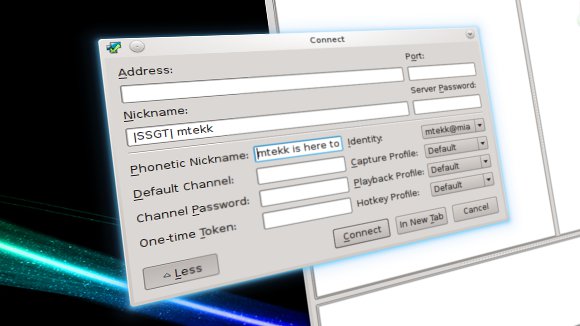
So how do we set the phonetic nickname in Linux? Well, it’s really simple. Go to “Connections > Connect”. In that prompt click the “more” button. You should now see a field that is labeled “Phonetic Nickname”.

Alternately, you can dive into the Teamspeak configuration files (like I did). Under your home directory there should be a directory named “.ts3client”, in a terminal you can see it using ls -a ~/. Within .ts3client there should be a file named “ts3clientui_qt.conf” open this up with your favorite text editor (e.g. nano: nano ~/.ts3client/ts3clientui_qt.conf). Scroll down to the bottom of this file, there should be a section named “[Connecting]” the last field should be “LastUsedPhoneticNickname=” just append to this setting your phonetic nickname (e.g. “LastUsedPhoneticNickname=mtekk”).

-John Havlik

[end of transmission, stay tuned]
Tagged: ,
Updated:

Breadcrumb NavXT 3.5.0

Holy customizable widgets Batman! With Breadcrumb NavXT 3.5.0 not only can you have multiple widgets (WordPress 2.8 Widget API), but you can also specify the options normally exposed to bcn_display();. Other changes to note are the addition of two filters, bcn_before_fill and bcn_after_fill, to bcn_breadcrumb_trail::fill(). These should allow for easier extension of Breadcrumb NavXT (though, with custom post type support coming in 3.6.0 this may be redundant). Finally, the settings page code has been rewritten and modularized, in the process, several outstanding bugs should have been squashed (no settings on first install).

Please note that this release requires WordPress 2.8 or newer.

Many thanks to Karin Sequen, Patrik Spathon, and Luca Camellini for submitting updated Spanish, Sweedish and Italian translations. Sadly, the French, German, Russian, and Dutch translations have fallen out of date. If you want to pick up translation of any of these, or want to submit a translation in your language, send me an email. For 3.6.0, I’d really like to get all of the translations up on the same page again.

You can grab the latest version of Breadcrumb NavXT from the Breadcrumb NavXT page.

-John Havlik

[end of transmission, stay tuned]

Spring Photos

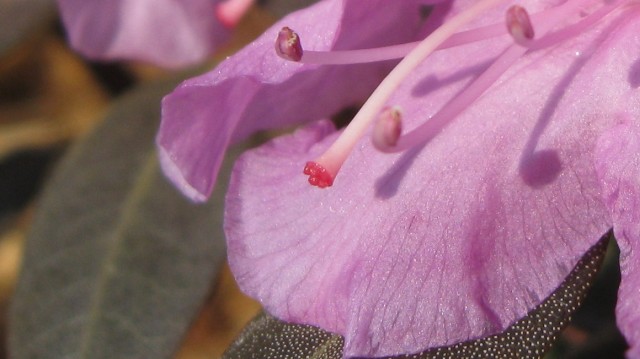
These were taken with my Cannon SD850IS a few months ago, back during the tree bloom (the “first bloom” of the season). Everything was shot in “macro mode”, no flash, everything else set to auto. Cropped using the Gimp, no other post processing.

Continue reading

Quick Tip: Windows 7 Doesn’t Like Looking into the Future

Over the last week or so, my Windows 7 desktop has intermittently had problems connecting to atomtux. While accessing atomtux via Firefox worked, the Windows file sharing component refused to connect. Occasionally, performing a system restore would fix the issue. However, sometimes it did not help. After a little searching, it looks like the problem was that atomtux’s clock was ahead of my desktop’s (by about 10 minutes). After getting my desktop’s clock back on track (it was falling behind as atomtux synchronizes daily) it once again could access network shares from atomtux.

The moral of the story, if Windows won’t connect to a network share, check your clocks.

-John Havlik

[end of transmission, stay tuned]

Tagged:
Updated:

The Crib’s 5 Years Old

On this day, way back in 2005, the first post on this blog was published (there is one article that predates the blog, it was added after the first post and backdated). Since that time a lot has changed. WordPress has changed dramatically over the past five years. This blog originally ran WordPress 1.5; it now runs WordPress 3.0 beta 1.

Being the five year anniversary of the beginning of this blog, changing themes today seems appropriate. This is Cran-Berry 2. While it is a little rough around the edges, in the coming weeks it will be polished and expanded upon. Once WordPress 3.0 is released, a public version of Cran-Berry 2 will be available.

-John Havlik

[end of transmission, stay tuned]