
Link to a Page Rather Than the Category Archive in a Breadcrumb

A topic that frequently comes up in the support forums is how to have a breadcrumb representing a category link to a Page (instance of the Page post type) rather than a category archive. Since this is not natively supported by WordPress, Breadcrumb NavXT does not natively support it. However, there is a filter that can facilitate this behavior.

The presented solution is a simplistic example for a single category. However, it can be extended for multiple categories, or taxonomy terms. Finally, rather than being hard-coded, the IDs could come from a term_meta field.

The Code

add_filter('bcn_breadcrumb_url', 'my_breadcrumb_url_changer', 3, 10);
function my_breadcrumb_url_changer($url, $type, $id)
{
	if(in_array('category', $type) && (int) $id === MYCATID)
	{
		$url = get_permalink(PAGEID);
	}
	return $url;
}

After placing this code into your site specific plugin, you will need to update two portions of it. Replace MYCATID with the ID of the category you want to change the link on, and replace PAGEID with the page you wish for the breadcrumb to link to. That’s it. Simple, right?

-John Havlik

[end of transmission, stay tuned]
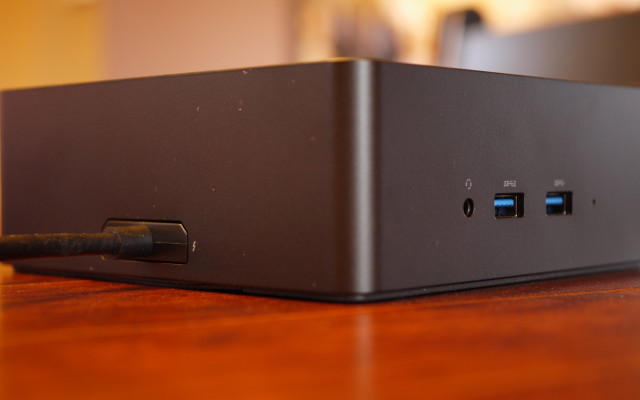
Dell’s Thunderbolt Dock 240W (450-AEVM)

When Dell released the XPS 15 9550, they also announced a Thunderbolt docking station to take advantage of the 9550’s Thunderbolt 3 port. Dell referred to it as the TB15. However, one does not simply purchase the TB15, it comes packaged with a power brick. The 450-AEVM is a TB15 packaged with a 240W power brick. A package with a 180W power brick also exists.

Continue reading

Tagged:
Updated:

XPS 15 9550

When the last generation of XPS 13 laptops came out with the infinity display, I eagerly awaited an update to the XPS 15 that offered the same minimal bezel design. The Dell XPS 15 9550 is said machine. I had been looking for a 14″ laptop back when looking to replace my Vostro 1400. While I settled for the XPS 15 9530 in the last go around, the new XPS 15 9550 is best described as a 14″ laptop with a 15″ screen.

Continue reading

Working Around “[drm] stuck on render ring” on Intel GMA

After acquiring a Broadwell generation Core i3 NUC (the NUC5i3RYK to be exact) and installing Linux, KDE/X.Org would lockup and crash frequently. Checking dmesg, the following messages appeared:

[drm] stuck on render ring
[drm] GPU HANG:…

From the dmesg report, it is clear the crashes were caused by the GPU hanging. After further inspection of the dmesg logs, it appears this is due to a bug between Intel’s graphics and IOMMU drivers. The easiest way to work around this is to disable Intel IOMMU support.

Since I had compiled IOMMU support into my kernel, removing IOMMU support involved a kernel recompile. When configuring your kernel using menuconfig, make sure that “Support for Intel IOMMU using DMA Remapping Devices” under “Device Drivers > IOMMU Hardware Support” is unchecked. This is equivalent to ensuring that INTEL_MMU = n in your .config file. For the NUC, that was all that was required to keep the GPU driver from crashing and taking X.Org and KDE down with it.

-John Havlik

[end of transmission, stay tuned]

WP Lynx 1.1.1

What’s this? A bugfix release for WP Lynx? That’s right, announcing the immediate availability of the first bug fix release for WP Lynx 1.1. Three bugs were squashed in this release. In 1.1, the uninstaller was moved to a newer uninstaller akin to what Breadcrumb NavXT received in 5.3.0. However, the wrong class was instantiated, causing uninstalls to not work, this has been fixed in 1.1.1. Additionally, a bug in the settings page content alignment in WordPress 4.4 was fixed. Lastly, the Lynx Print adding interface now handles server side errors more gracefully.

You can grab the latest WP Lynx on the WP Lynx WordPress.org plugin page.

-John Havlik

[end of transmission, stay tuned]