
How to Add li and Other Tags to Breadcrumb Templates

Since Breadcrumb NavXT 4.3.0, all settings that can contain HTML are passed through wp_kses(). With this change, only a basic set of acceptable tags and properties within tags were allowed. Naturally, this restricted users more than they were used to. The restriction wasn’t the biggest problem, the lack of a filter to allow users to add their own tags in to the allowed HTML tag list. However, with Breadcrumb NavXT 4.4, a new filter bcn_allowed_html has been introduced to fix this issue.

The default set of allowed HTML tags in Breadcrumb NavXT 4.4 consists of: <a>, <img>, <span>, <h1>, and <h2>. For the purposes of this guide, let’s assume you don’t want to use the built in bcn_display_list() function to output breadcrumbs wrapped in <li> tags. The reason you would want to do this is if you need additional properties within the tag (Breadcrumb NavXT will by default add a class but that’s it).

In Breadcrumb NavXT 4.4, adding a tag to the allowed HTML list for Breadcrumb NavXT is really easy. Just create a function with one input argument ($allowed_html in this example). Within that function append, using the HTML tag name as the array entry key, assign an array of properties that tag is allowed to have, using the property name as the array entry key and a value of true. Then add your filter function to the ‘bcn_allowed_html’ filter hook. Below is an example of this for the <li> tag with a selection of properties.

function my_bcn_allowed_html($allowed_html)
{
	$allowed_html['li'] = array(
		'title' => true,
		'class' => true,
		'id' => true,
		'dir' => true,
		'align' => true,
		'lang' => true,
		'xml:lang' => true,
		'aria-hidden' => true,
		'data-icon' => true,
		'itemref' => true,
		'itemid' => true,
		'itemprop' => true,
		'itemscope' => true,
		'itemtype' => true
	);
	return $allowed_html;
}
add_filter('bcn_allowed_html', 'my_bcn_allowed_html');

To get started quickly, just copy and paste the above code into a site specific plugin and start playing.

-John Havlik

[end of transmission, stay tuned]
WP Lynx 0.6.0

Say hello to a new, better organized, settings page. Settings are now organized by context, with many of the advanced, infrequently used settings sitting under the advanced tab. In the process of updating the settings page, the underlying plugin core was updated to the latest mtekk_adminKit, which already ships with Breadcrumb NavXT.

Additionally, WP Lynx now supports capturing a screenshot of a website and using that as the thumbnail image. This is provided though Snapito!, you’ll need to grab an API key for it to work. Note that the site screenshot will always be the second image in a thumbnail set, unless no other thumbnails were found. Also note that the initial loading of a screenshot may take several seconds. Please wait for the screenshot to load in the window before inserting the lynx print to ensure WP Lynx can cache the image properly.

Lastly, a few tweaks were made to the scraping engine to fix the causes of PHP notices in cases where something went wrong in retrieving a site.

Note that this releaseĀ  is the first in a series of planned releases between now and 1.0. Each will add a minor number of features, tracked in the WP Lynx GitHub Repository.

-John Havlik

[end of transmission, stay tuned]
vBulletin Style Breadcrumbs for WordPress

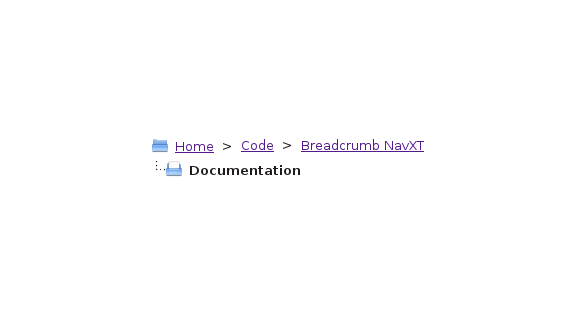
vBulletin is a somewhat popular forum software package that has a unique breadcrumb design. Rather than the normal, single lined breadcrumb trail, it drops the current item’s breadcrumb to a second line. It also happen to have two folder icons for flair, but those are trivial to add in with CSS3. Even without CSS3 adding the icons is fairly easy (set as a non-repeating background image).

Continue reading

Breadcrumb NavXT 4.3.0

Holy incremental improvements Batman! Rather than one big new thing, this release has several tweaks that improve the overall plugin. Two new breadcrumb template tags were added, %ftitle% and %fhtitle%. These two tags are not affected by bcn_breadcrumb::trim() and are thus suitable for the title attribute in links when a max breadcrumb length is set. Support for the Theme Hook Alliance’s proposed tha_breadcrumb_navigation filter was added.

The Home and Main site titles were removed as they were redundant. While doing this, now the %title% and %htitle% tags return the “Site Title” for the home breadcrumb and “Network Name” for the mainsite breadcrumb. This should make multisite installs a little more manageable until the network admin is available.

As a security precaution, all settings that accept HTML now are passed through wp_kses. A reasonable set of accepted HTML tags were added, if you run into an issue where a tag or attribute you were using is being stripped, please report it in the comments section below.

Finally, several bugs were fixed. Loading of translated default settings now works again. And, some tweaks to the tabs in the settings page were made to improve the look and feel in WordPress 3.5.

The Translation Team:

[glot-translators=breadcrumb-navxt]

As always, you can grab the latest version of Breadcrumb NavXT from the Breadcrumb NavXT page. If you experience any issues with this version of Breadcrumb NavXT, please leave a comment on this post detailing the issue.

-John Havlik

[end of transmission, stay tuned]

A New Settings Page

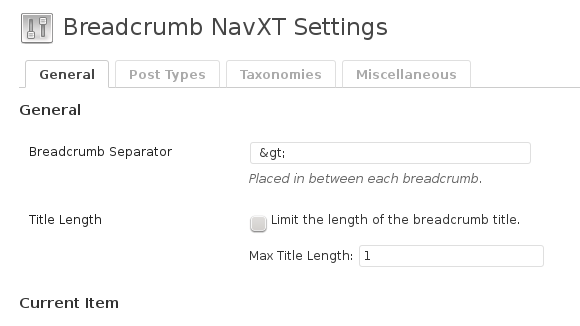
The most noticeable change in the next version of Breadcrumb NavXT (4.2.0) will be the reorganized settings page (preview screen shot above). Since the introduction and subsequent inclusion of tabular (the code that gives the settings page its tabs), each custom taxonomy and post type has had it’s own tab. This will no longer be the case where there are just 4 tabs, “General”, “Post Types”, “Taxonomies”, and “Miscellaneous”.

This reorganization, while causing the content per a tab to be greater, keeps the tab list from growing with every new custom post type and taxonomy added to a site. Additionally, it allows greater distinction between settings for custom taxonomies and custom post types. Previously, there were instances where CPTs and custom taxonomies had the same name in their tabs and it was not clear which was which without entering that tab.

Keep tabs on Breadcrumb NavXT 4.2.0 development over at GitHub.

-John Havlik

[end of transmission, stay tuned]